 A
SetCut: a workout app built around your routine videos
An iPhone workout app built around routine videos from creators you follow. Turn them into sessions with named exercises, reps, timers and adjustable rests.
I’m into fitness, and I spend plenty of recovery time watching people move. A creator shares a workout, a dancer posts a drill, an athlete or gymnast demonstrates a routine. I’ll often save one on Instagram and think, “I should try that.” Before long, I have a Saved collection full of routines I want to do with a friend who’s just as sporty as I am.
Then we meet up and fall back on the workouts we already know. The ideas are there, but turning one into a session takes effort. Find the right clip. Watch it through. Rewind to catch the next move. Count reps and keep an eye on the clock. How long was that rest? Which exercise came next? A few little decisions can be enough to put the new routine off again. If you have a Saved collection of your own, you may know the gap: it’s easy to save a clip and surprisingly easy to leave it untouched when it’s time to train.
The workout library I wanted was already in my videos
I wasn’t looking for another generic workout catalogue. The routines I want to practise come from creators whose work I already follow. SetCut has the familiar shape of a workout app: a notebook, sessions to start, a workout for the day and a calendar. The difference is the catalogue. It’s made from the routine videos I choose, rather than a library picked for me by the app.
To get started, I choose a routine video from my iPhone photo library, or share it into SetCut from the library. SetCut doesn’t fetch videos from Instagram, TikTok or YouTube, and it doesn’t post anything. My Instagram Saved collection is where I keep the ideas that catch my eye. SetCut organises sessions made from videos in my library.
From one video to a session I can follow
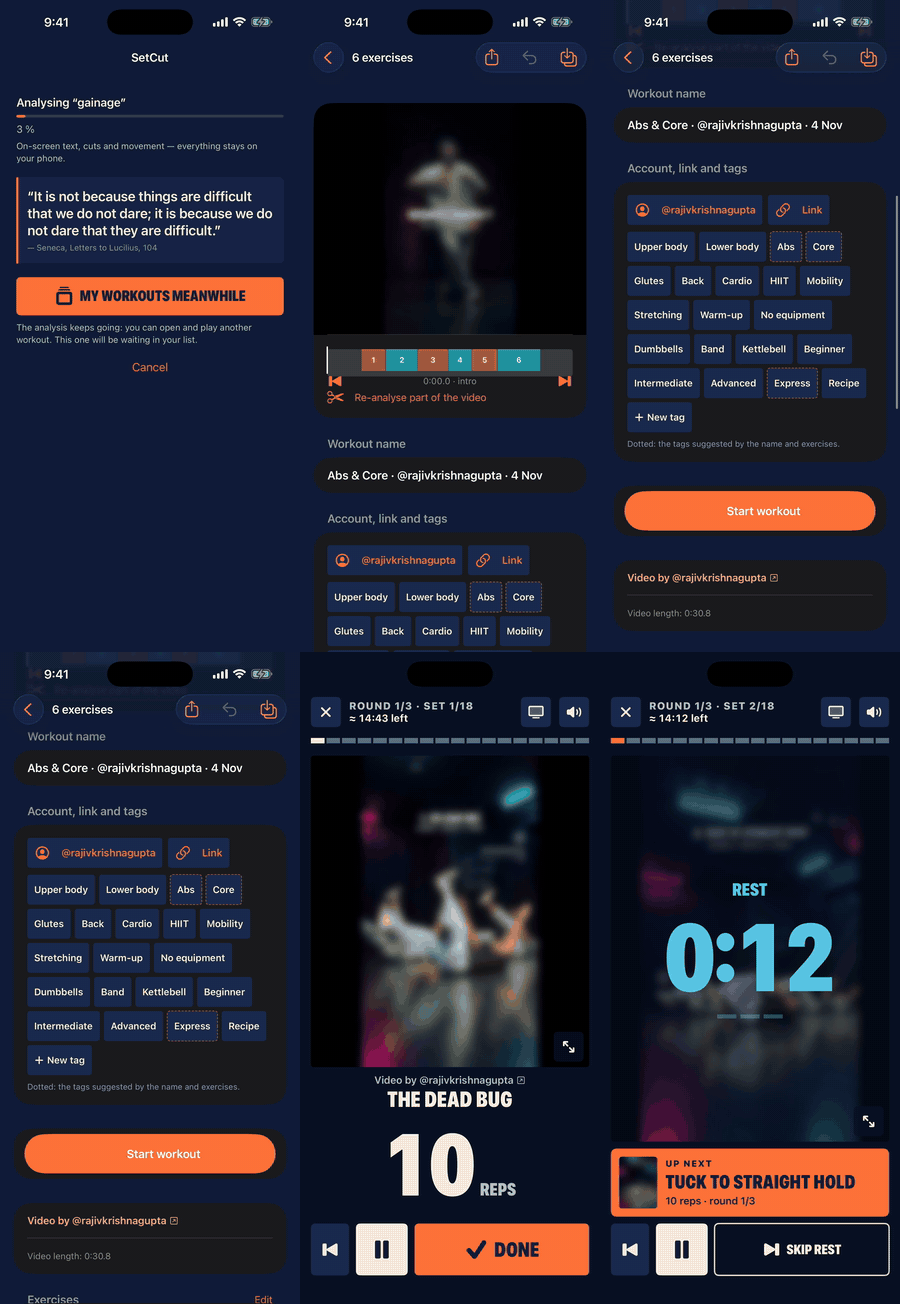
When I add a video, SetCut splits it into named exercises. It reads the text shown on screen and looks for shot changes and movement. If the creator gives instructions such as “3 × 12”, “30 sec” or “4 rounds”, SetCut reads those too. Analysis takes anywhere from a few seconds to about a minute.
I don’t have to wait by the analysis screen. I can go back to my notebook and start another session that’s ready to go. The new one appears in the notebook as soon as its analysis is finished. And if a suggested cut doesn’t match what I want to practise, I can fix it: rename an exercise, move it into a different order or cut a section again.
I can also combine videos in one session. That’s when the personal catalogue starts to feel useful. Instead of following a ready-made plan, I can build a workout from the routines that have caught my attention and make the session my own.
More moving, less watching the screen
Once the session starts, SetCut helps me keep the flow. There’s a timer for timed exercises and a “Done” button for reps. I can set the rest periods, hear beeps during the final seconds and, if I want, turn on Apple’s synthetic voice to announce the next exercise. I can also put the session up on a TV with AirPlay.
The idea is to spend less time handling the video and more time doing the moves. My notebook keeps the workout for the day, a calendar, my training rhythm and flame markers. The routines I saved as possibilities can start becoming part of the workouts I actually do.
A session to share with a friend
Sharing a workout with my friend was part of the idea from the start. A session can be shared as a file through AirDrop or Messages, without a video. If I choose, I can share it with my own videos, too. That gives us a straightforward way to pass along what we’ll practise, using the routines that made us want to move in the first place.
The creators remain part of that session. The notebook keeps the creator’s account and the original link, so I can give credit and find the source video again. SetCut doesn’t replace the creator’s work. It helps me practise what they show and keeps their name close to the session.
The analysis stays on your iPhone
Video analysis runs on the iPhone. No video is sent to a server, and there’s no account to create. The privacy policy explains the details, including how the app handles advertising.
Free to train, or unlock favourites for €2.99
SetCut is free. Cutting videos into exercises, building sessions and sharing them stay free, too. Discreet Google banner ads help support the app. They don’t appear during a workout or on the analysis screen.
A one-time purchase, SetCut Full, costs €2.99 for the lifetime of the app. It works across the devices linked to your Apple ID and with Apple Family Sharing. It removes ads and unlocks exercise favourites: star an exercise to save it, then build sessions from your favourites. You can pick the moves you liked best from several creators and bring them together. As a bonus, it also unlocks a simple recipe view for cooking videos. It’s a way to support the project as well as unlock those extras.
SetCut is the first app Arcodange will publish. We’re also building ReCoDanse, an app for dance practice. SetCut is coming soon to iPhone. If you’d like to hear when it arrives or share your thoughts, write to me at [email protected].
- Terms of use (in French)
- Privacy policy (in French)
- Contact: [email protected]